
Customer-reported within days of sharpening the positioning and posting consistently.
The LinkedIn content platform
Turn expertise into a business growth engine.
Create stronger content, publish consistently, and turn the expertise already inside your business into visibility, conversations, and opportunity.
- 14-day pilot
- No credit card
- Guided setup
Trusted by founder-led B2B teams






 Catalyst Revenue
Your first week
From expertise to consistent publishing in four moves.
See the value before you learn every feature.
- 01Set the direction
Answer a few questions about your audience, goals, voice, and what you know.
- 02Review five useful drafts
Choose the ideas worth saying and make each one recognizably yours.
- 03Schedule the strongest posts
Coordinate personal profiles and the company page in one calendar.
- 04Come back to evidence
See what created attention and conversation, then choose the next test.
The current Latitude experience
From the next idea to the next opportunity.
Every view follows the current product experience, using representative data to show the complete workflow.
01 / 04
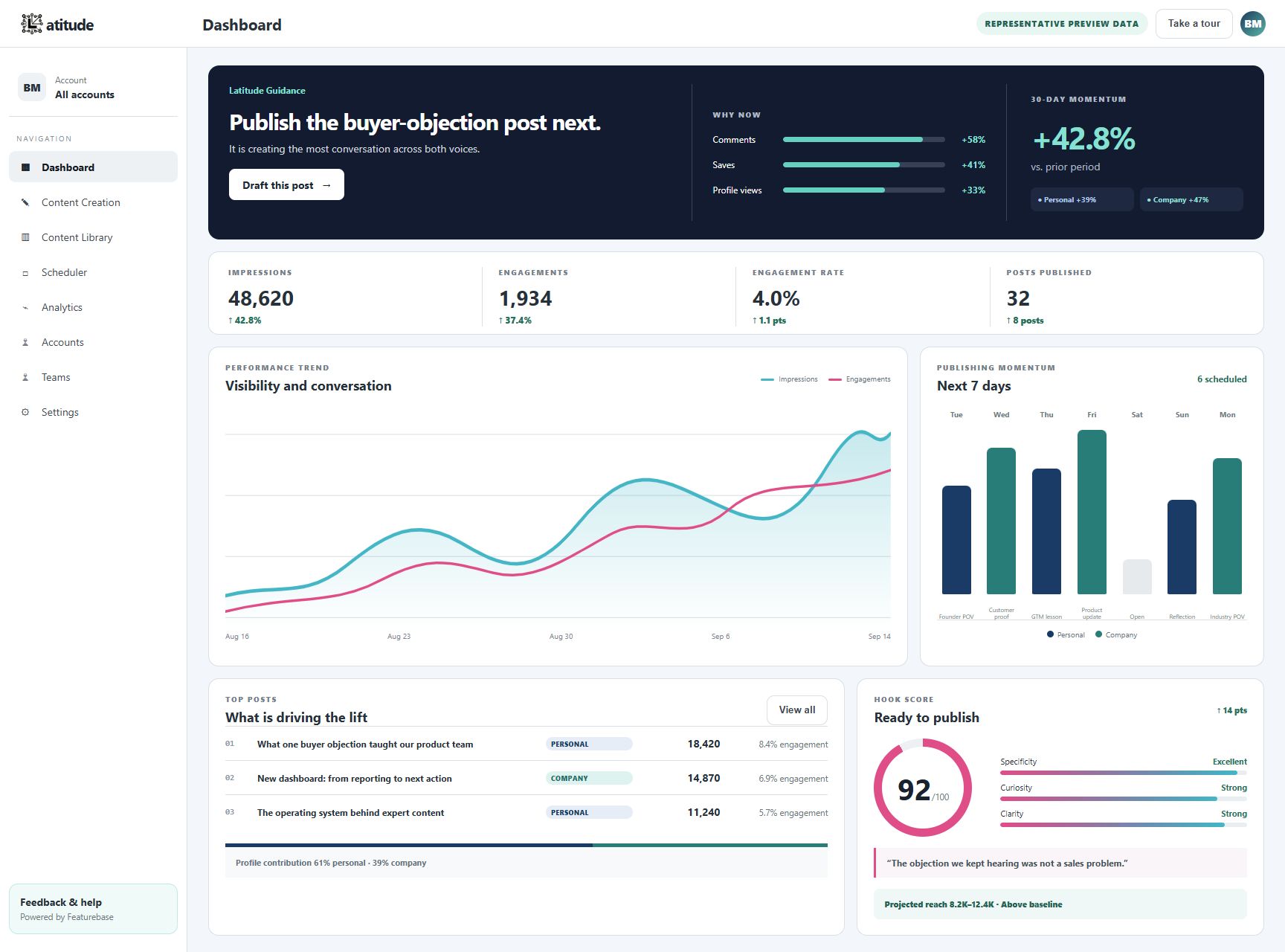
Dashboard
See performance, publishing momentum, and a clear next action in one focused view.
Choose your path
One platform, built around how you work.
Selected outcomes
Proof that points beyond impressions.
Visibility matters because of what it creates next: stronger engagement, real conversations, and revenue opportunities.

“You helped me work my niche and position myself properly… to get four [meetings] in three days is huge.”
1,563%increase in LinkedIn engagements vs. the prior 365 daysCustomer-provided LinkedIn analytics
2–5new sales conversations within days
$6K/mocustomer won after changing the message
Different roles, useful proof
Judge the work by what it creates next.
Latitude connects content activity to the business result each person actually cares about.
Customer-reported after a message change made the offer easier to understand.
Customer-provided LinkedIn analytics compared with the prior 365 days.
Benchmark guidance
Know what to test next.
Latitude combines recent performance with shared patterns to recommend one controlled experiment at a time.
- Opening scoreStrengthen the opening before the post goes live.
- Your historyCompare against the way your own audience responds.
- 28-day changeSeparate a useful signal from a single-post spike.
Human where it matters
Latitude helps with the content. You keep control of the relationship.
Latitude helps
- Strategy and idea selection
- Drafting and review
- Scheduling and measurement
You stay in control
- Approval before publishing
- Comments and direct messages
- Connection requests
LinkedIn connections use OAuth and explicit permissions. No shared LinkedIn password is required.
AI assistant connection · available by request
Bring Latitude context into a supported AI assistant.
Work with your strategy, drafts, and performance context in plain language. You still review the content, and nothing publishes without approval.
Interactive demo
Click through the workflow yourself.
Explore the current Latitude workspace with sample content. Draft, plan, and inspect results at your own pace. Nothing publishes from the demo.
Open interactive demo ↗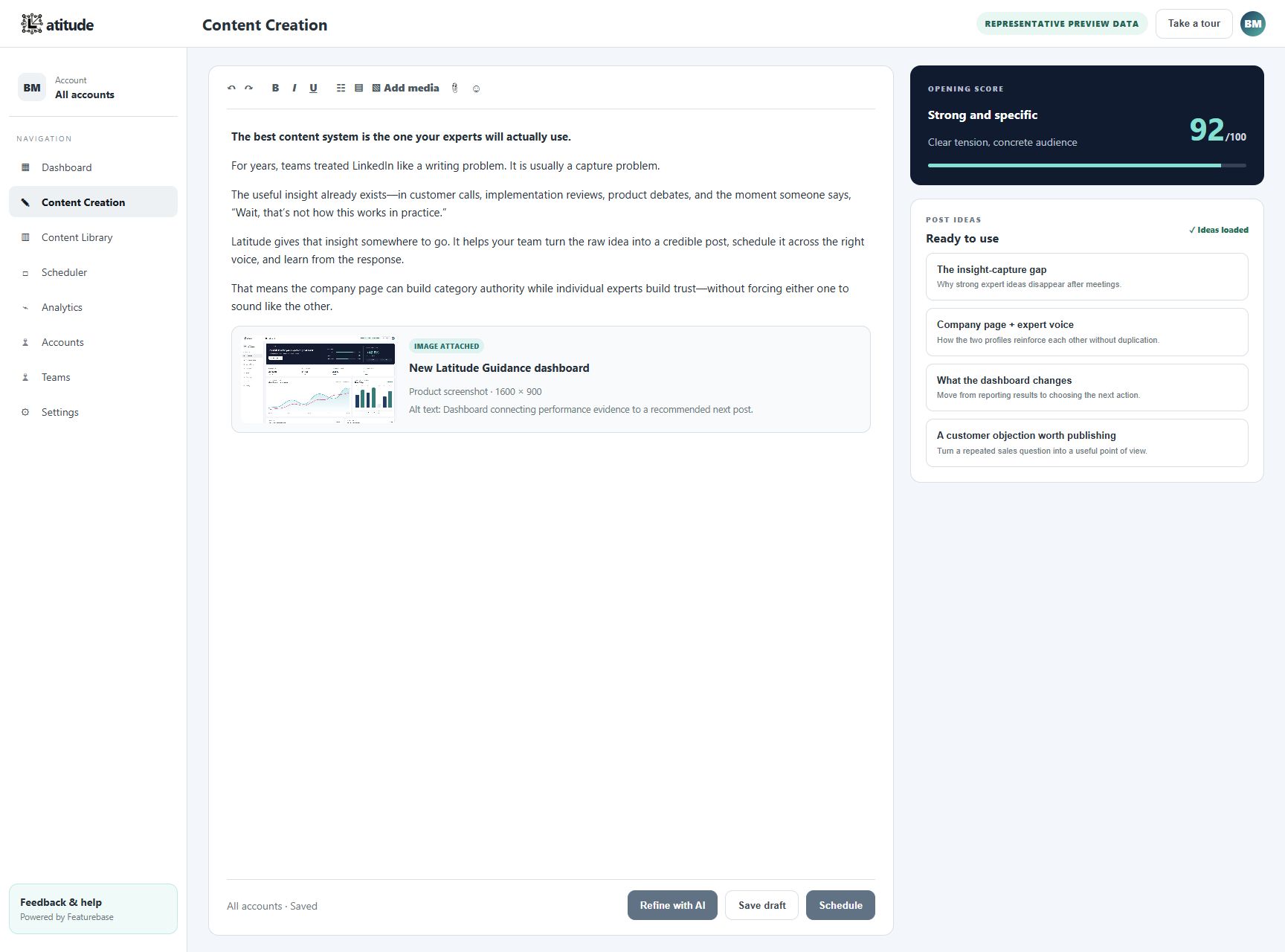
Flexible access
Choose the right Latitude plan.
Start with one dedicated workspace, or bring your team into a shared one.
Most popular
Latitude Standard
$34.99/mo
Switch to annual and save $120 per year.
One Latitude instance for one user, with up to three connected LinkedIn accounts, including personal profiles, company pages, or a mix of both.
- 1 named user in a dedicated Latitude workspace
- Connect up to 3 personal profiles or company pages for that user
- AI-assisted ideas, drafting, scheduling, and analytics
- Voice and writing settings you can reuse
- Results for each post with comparisons over time
- In-app guidance from the Latitude team
Need multiple people to log in? Ask about Latitude Teams.
For larger operations
Latitude Teams
CustomLet’s talk
One shared Latitude instance for multiple users managing multiple LinkedIn accounts, including personal profiles, company pages, or both.
- Multiple users in one shared Latitude workspace
- Multiple personal and company LinkedIn accounts
- See activity and results for every connected profile in one workspace
- All Accounts dashboard, scheduler, calendar, and analytics
- Profile-specific strategy so each voice stays distinct
- Setup help for every connected profile
We’ll design the package around your organization’s goals.
Questions before you sign in
The practical details.
Clear answers about the pilot, plans, support, publishing, and data.
How does the free pilot work?
Latitude offers a 14-day pilot with no credit card required. Create your Latitude account and your pilot begins immediately. No manual activation is required.
During the pilot you can connect your LinkedIn profile, draft and schedule posts, explore Standard with up to three connected accounts, and review performance analytics, saved drafts, and brand assets.
What features come with each plan, and do annual subscriptions save money?
Latitude Standard is one instance for one user and includes AI-assisted ideas, drafting, scheduling, analytics, and up to three connected LinkedIn accounts, including personal profiles, company pages, or both.
Latitude Teams is one shared instance for multiple users managing multiple LinkedIn accounts. It adds team access and approval controls, more connected accounts, and setup help.
Annual Standard saves $120 per year compared with monthly billing while keeping the same product access and support.
What onboarding or support is included?
Every account includes guided setup, in-product content strategy, weekday email and in-app chat support, and help configuring connected accounts and team roles.
How does Latitude learn from my LinkedIn presence?
Latitude uses the LinkedIn examples, writing samples, and notes you choose to provide. You can update that guidance whenever your goals change.
How does Latitude keep each person’s voice distinct?
Writing guidance stays specific to each profile, while permissions, drafts, scheduling, and reporting can still be coordinated from one workspace.
Does Latitude integrate with Slack, HubSpot, or other tools?
Not yet. Latitude currently focuses on planning, creating, publishing, and measuring LinkedIn content inside the platform. Calendar and performance data can be exported for use elsewhere.
What results have customers seen with Latitude?
Customers report posting more consistently, reaching more people, and starting more sales conversations with Latitude. The results section includes named customer stories and figures they approved; broader totals are checked against current product data before they are published.
Does Latitude handle comments or direct messages for me?
No. Latitude helps plan, create, publish, and measure posts. You remain in control of comments, direct messages, and connection requests.
How can I explore Latitude before committing?
Launch the interactive product tour, start the free pilot, or contact the Latitude team for a guided walkthrough.
How does Latitude protect customer data?
Latitude encrypts data in transit and at rest, limits access to approved team members, and follows documented retention schedules. You can request a data export or deletion at any time, and Latitude never sells LinkedIn credentials or content to third parties.
Choose the path that fits